The review desk · Practical guides
How to check webpage text for AI
A webpage contains more than an article. Review what was retrieved before asking a detector to assess its writing.
One page, two deliberate steps
CouldItBe retrieves text from one public URL. Retrieval alone does not send the writing to GPTZero. You first review the extracted passage, then separately consent to screening. The result applies to the text actually submitted.
This is not a website-wide crawl. It does not check the page’s images, classify its source code, prove who owns the site or certify its factual accuracy. For image review, open the separate image tool.
- Open the website text tool and enter a public article URL. Do not use private, personalized or login-protected links.
- Retrieve the page and compare the extracted text with the visible article. Check its title, beginning and ending.
- Remove unrelated navigation, comments or repeated footer material if present. Do not rewrite the passage just to obtain a preferred result.
- Use at least 50 words and stay within the displayed character allowance, normally up to 10,000. Select a coherent passage if the article is longer, and record that the result covers only that passage.
- Read the consent notice, submit, and wait for a completed result. Save the report and your source/date notes.
What we observed on our own site
On November 4, 2026, we retrieved CouldItBe’s public user guide in the live website tool. The returned text began with navigation and theme labels before the guide body. That is a concrete reason to inspect extraction, even when retrieval succeeds.
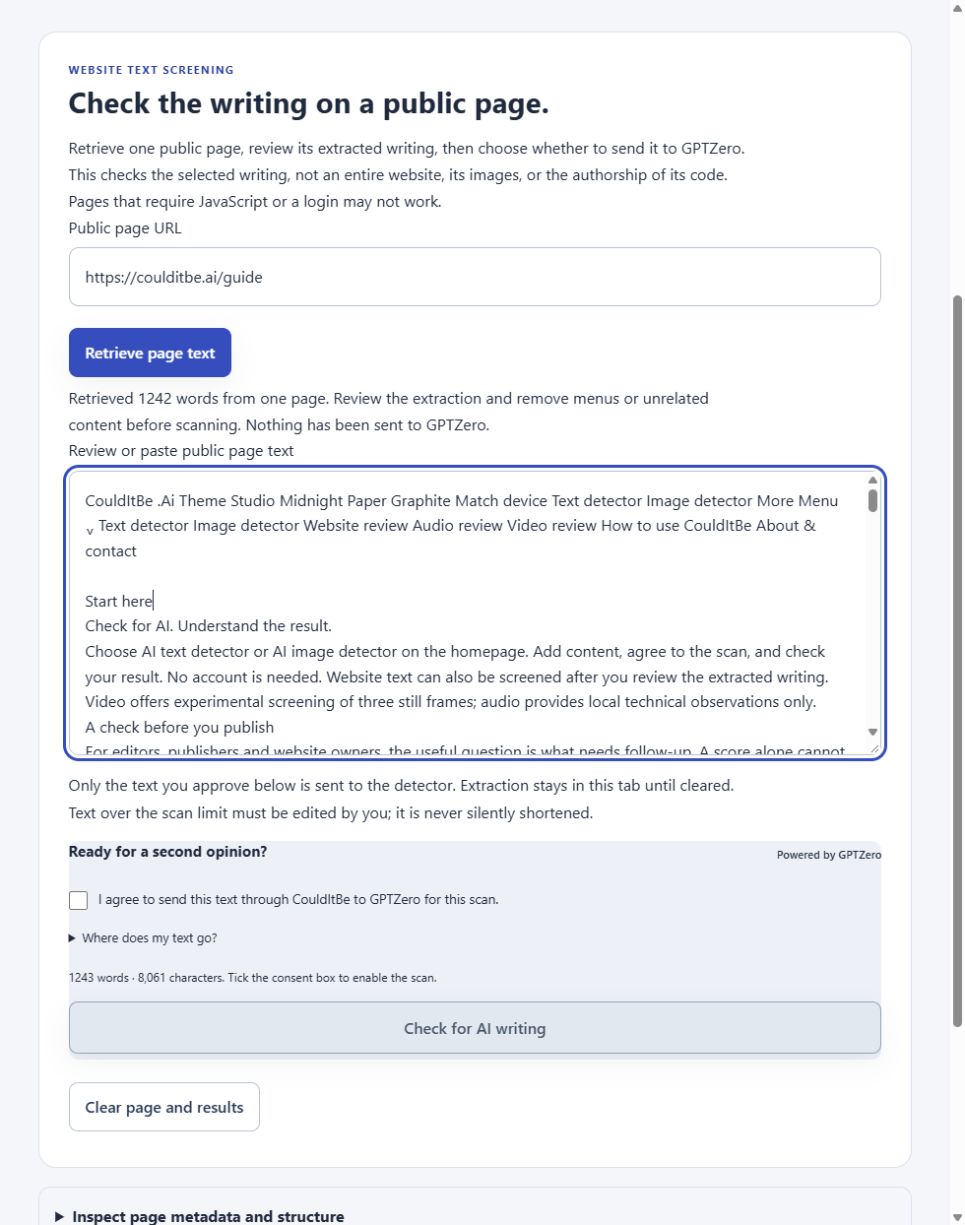
The next editorial step would be to remove menu and footer material and review the remaining passage. This demonstration tests retrieval and the consent boundary; it does not measure detection accuracy.
A worked extraction check
Original illustrative page · Not a detector test
Suppose the retrieved page contains the following blocks:
Navigation: Home · Subscribe · Latest
Article: The community garden opened its new greenhouse on Saturday. Volunteers will use the space to start seedlings before the spring planting season. The coordinator said the schedule will be posted after next week’s meeting.
Footer: Sign up for our weekly newsletter. Terms · Privacy
What belongs in the screening passage?
The article body belongs in an article-writing check. Navigation and the subscription message do not describe the author’s article. This short demonstration is below the tool’s 50-word minimum: find the full article rather than padding it with footer text.
What if the extraction contains only the menu?
Do not scan it as if it were the article. Some pages load their main text with scripts or restrict retrieval. Open the public article yourself and paste a passage you are permitted to share into the text tool, or record that the automated check could not retrieve enough evidence.
The example was written for this guide. No probability, classification or accuracy claim is attached to it.
Read the result at the right scope
A GPTZero classification concerns the submitted writing. Its confidence is not the percentage of a website made by AI. If you screen one passage, do not apply that result to every page, contributor or image on the domain. GPTZero explains classification and confidence here.
Check author disclosures, citations and drafting history separately. A website’s publishing platform or generator meta tag identifies a technical declaration, not the origin of its prose. Preserve uncertainty when evidence is incomplete.
For the current product controls and privacy boundaries, see the user guide and privacy policy. For conflicting results, read why AI detectors disagree.
Keep the evidence in context
These guides support a review, not a finding of misconduct. Read our methodology and actual test results, known limitations, and privacy policy. Report a correction if a source or product detail changes.
Browse all resources →